Field | Detail |
|---|---|
Client/Company | Bupa Australia & New Zealand |
Location | Melbourne, Australia |
Scope | User research, UX design, prototyping, user testing, final UI, design system |
Role | Senior UX Designer |
Deliverables | User research report, prototypes, user testing report, final UI, design system (UI Kit) |
Domain | UX Design, UI Design |
Timeline | 2019 – 2020 |
Bupa's customer service business unit had been running its Contact Centre of the Future program since 2018, a multi-year initiative to restructure how its consultants handled customer communications at scale. The voice team had already implemented NLU (Natural Language Understanding) capability for inbound calls, improving communication quality and reducing average handling time. The next frontier was messaging.
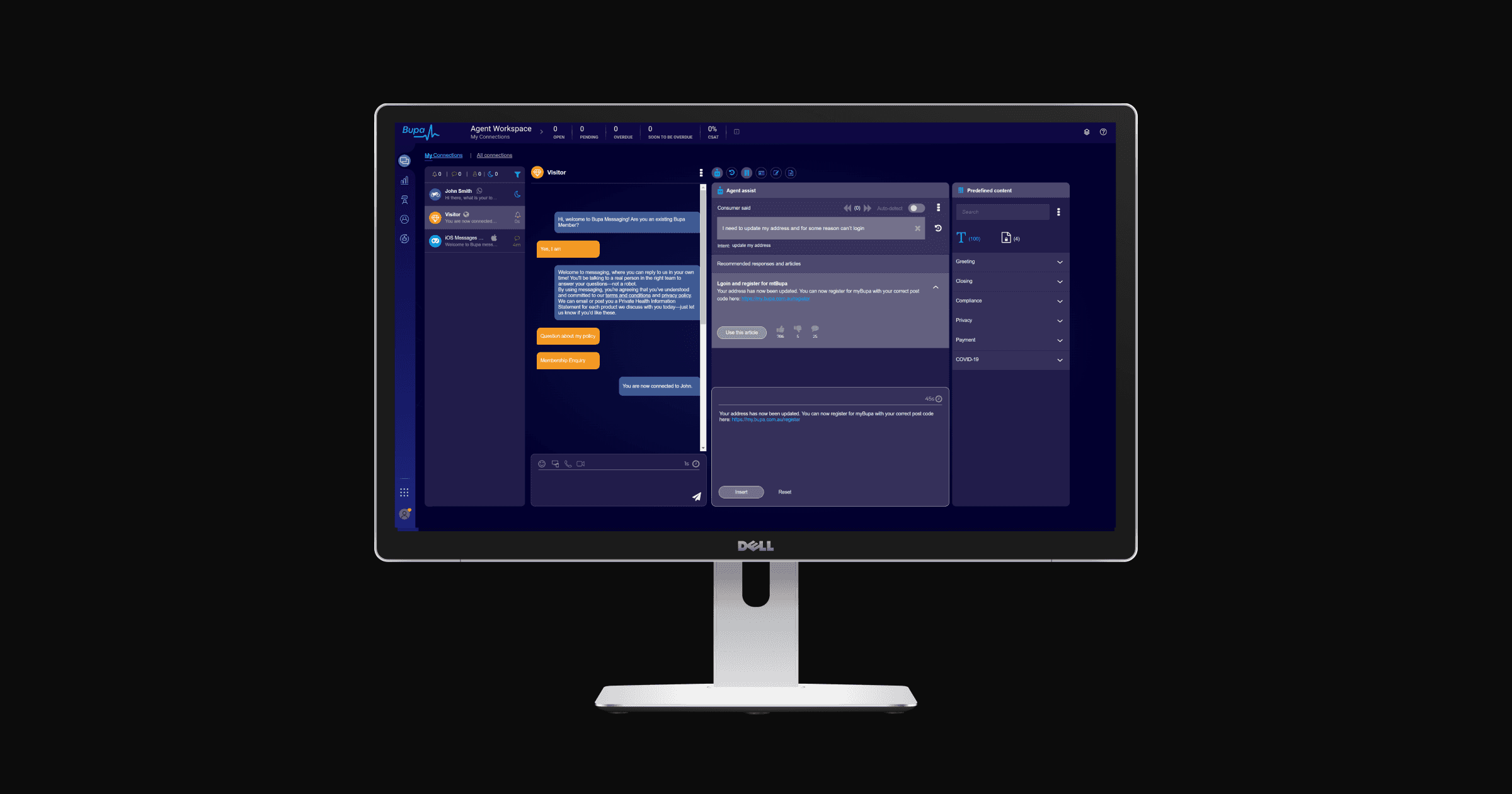
By 2019, the asynchronous messaging team was managing multiple customer enquiries simultaneously through a web-chat platform. As volume grew across channels including WhatsApp, Apple Business Chat, and web-chat, the business unit made the decision to introduce an AI-powered capability to help consultants respond faster, more accurately, and with greater consistency. The Agent Assist messaging widget was the design response to that challenge.
Challenge
The core problem was operational, but the surface it touched was human. Consultants were managing multiple live conversations at once, searching across several platforms to find the right information, and then manually re-wording knowledge base articles into a register suitable for messaging. It was slow, repetitive, and unsustainable at scale.
Introducing AI into this workflow carried its own risk. Consultants were anxious about what automation would mean for their roles. Stakeholders were focused on efficiency metrics. The design challenge was to build something that served both without compromising either.
Alongside the operational goals, AI ethics were treated as a first-class design consideration from the outset. The system needed to augment consultants, not replace them, and that distinction had to be legible in the product itself.
Approach
Discovery
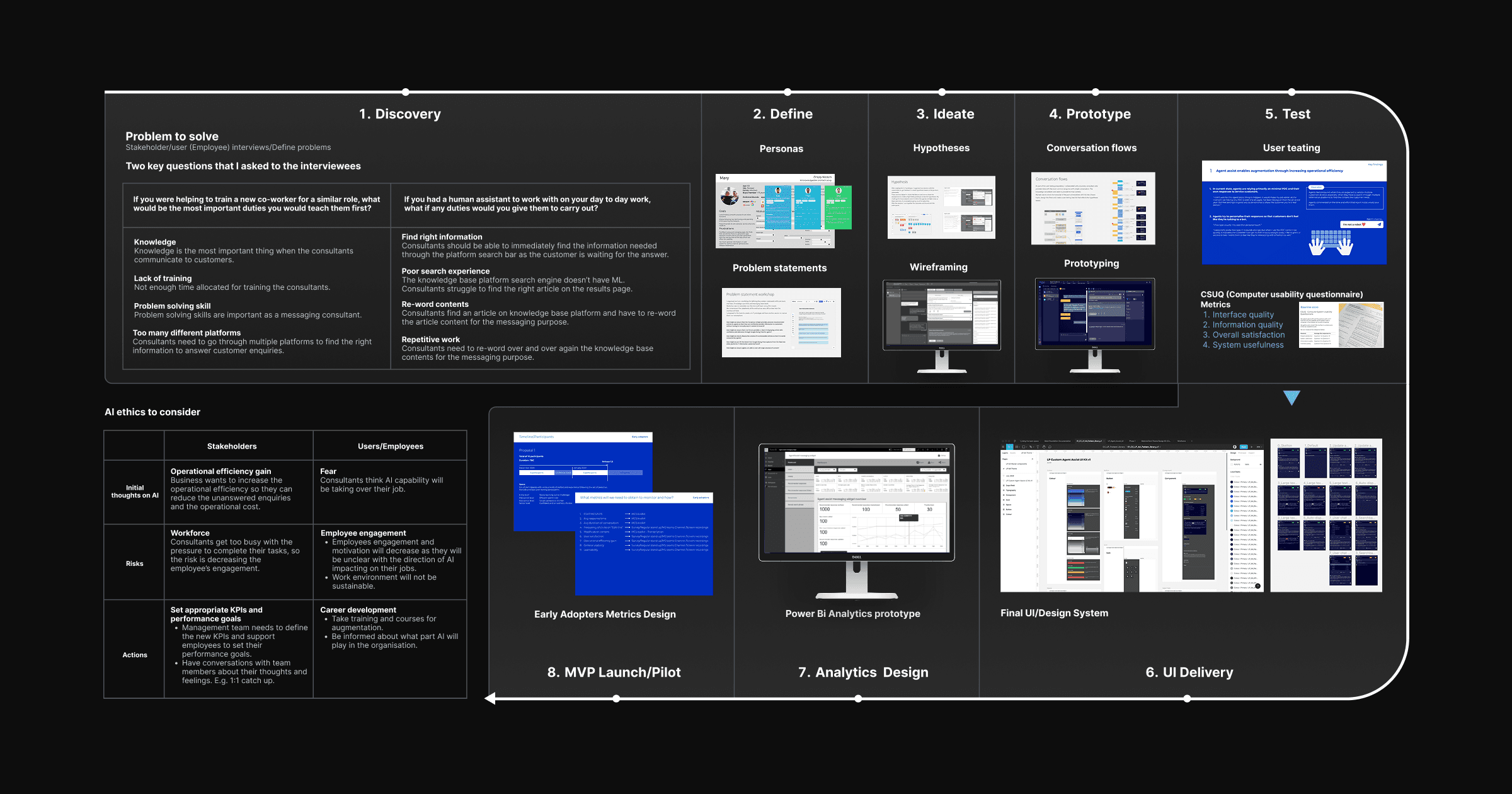
The process began with stakeholder and employee interviews, structured around two key questions about daily responsibilities and where support would be most valuable. These were chosen deliberately to surface what consultants valued in their own work, and what felt rote or draining, without framing the conversation around AI replacement.
Four recurring themes emerged across interviews: the centrality of knowledge to every customer interaction, insufficient training time, problem-solving as a core competency, and the burden of context-switching across multiple platforms to find answers.
Define
The interview findings were translated into four problem statements that shaped the entire design requirements.
Find right information — Consultants needed to locate the correct article immediately, while the customer was actively waiting. A slow or unreliable search created pressure and errors.
Poor search experience — The existing knowledge base platform lacked machine learning. Search results were unpredictable, and consultants spent too long scanning the results page for the relevant article.
Re-word contents — Once a consultant found an article, they had to manually translate it from knowledge base language into messaging language. The tonal shift was non-trivial and added time to every interaction.
Repetitive work — The re-wording step happened across every conversation, dozens of times per shift. It was the highest-volume, lowest-value task in the workflow.
AI Ethics Framework
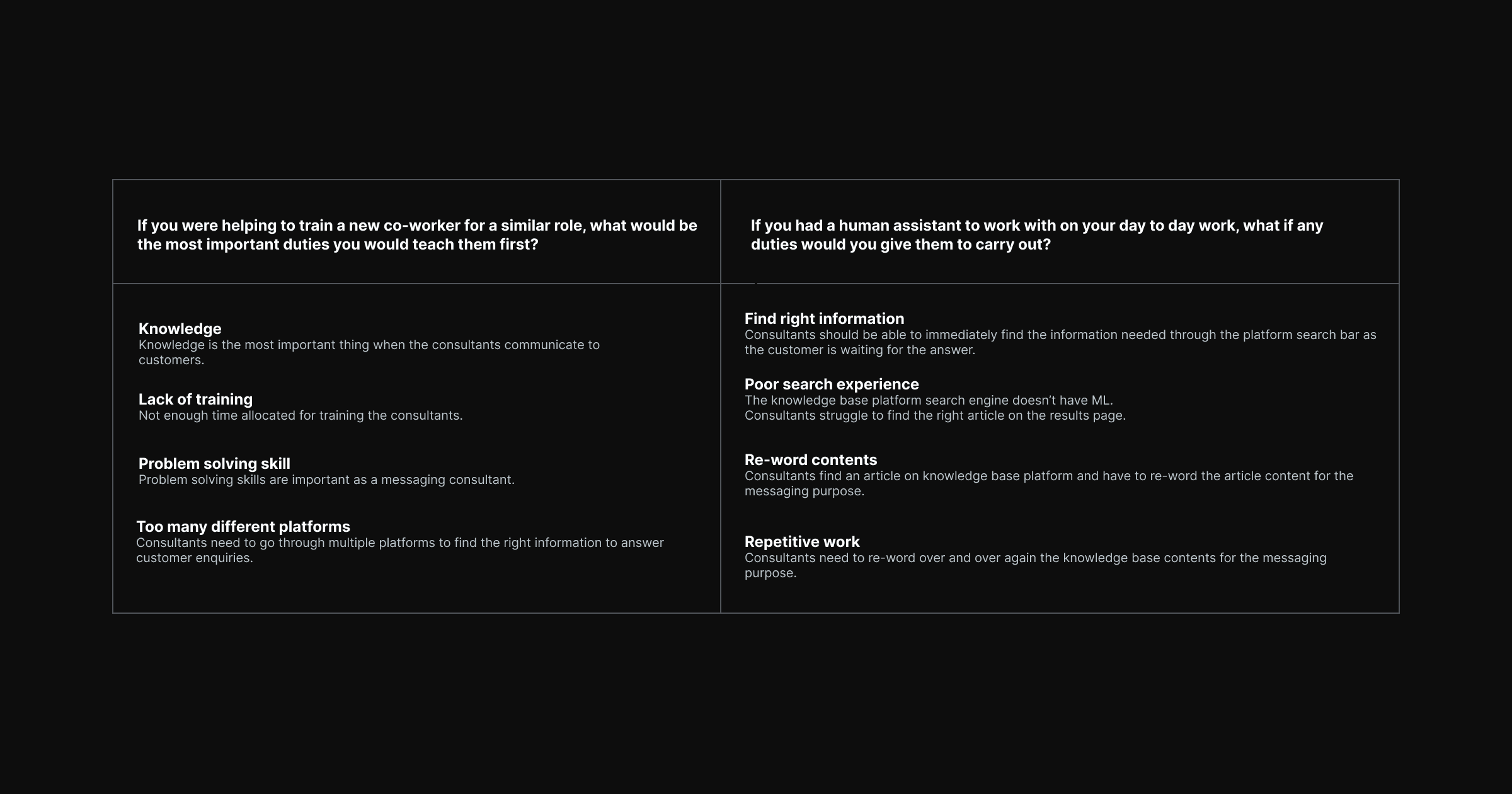
Before any ideation, the team worked through an AI ethics framework that examined the competing perspectives of stakeholders and consultants. From the business side, the focus was on operational efficiency, reducing unanswered enquiries and cost per interaction. From the consultant side, the concerns were more personal: fear of job displacement, declining engagement under pressure, and a lack of clarity about what augmentation would actually look like in practice.
The design framework set out to address both. Appropriate KPIs were established to measure the right outcomes. Career development pathways and training commitments were recommended alongside the product launch. The widget was positioned explicitly as an assistant rather than an automation layer.
Ideate and Prototype
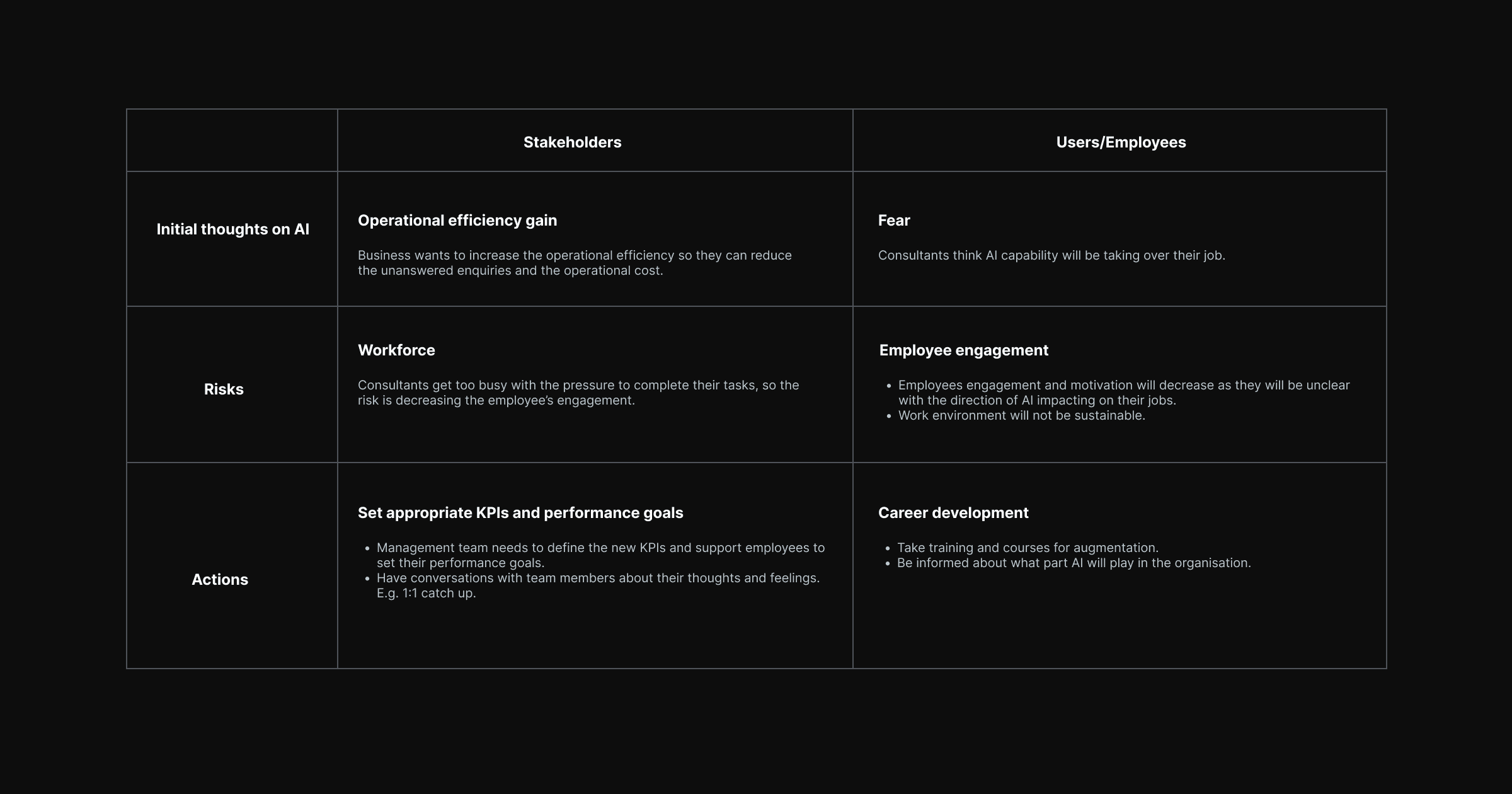
The ideation phase generated hypotheses around how an AI widget could surface relevant knowledge base content in context, reduce the re-wording burden through suggested phrasing, and be embedded within the existing agent workspace without requiring consultants to change platforms.
Conversation flows were developed to map how AI suggestions would appear in relation to the customer message thread. Wireframes went through multiple rounds of iteration before advancing to high-fidelity prototyping.
Links to the prototypes
Test
User testing was conducted using the Computer System Usability Questionnaire (CSUQ), measuring across four dimensions: interface quality, information quality, overall satisfaction, and system usefulness. The testing protocol captured both quantitative usability scores and qualitative consultant sentiment, particularly around the AI ethics concerns surfaced during discovery.
Analytics Design and MVP Launch
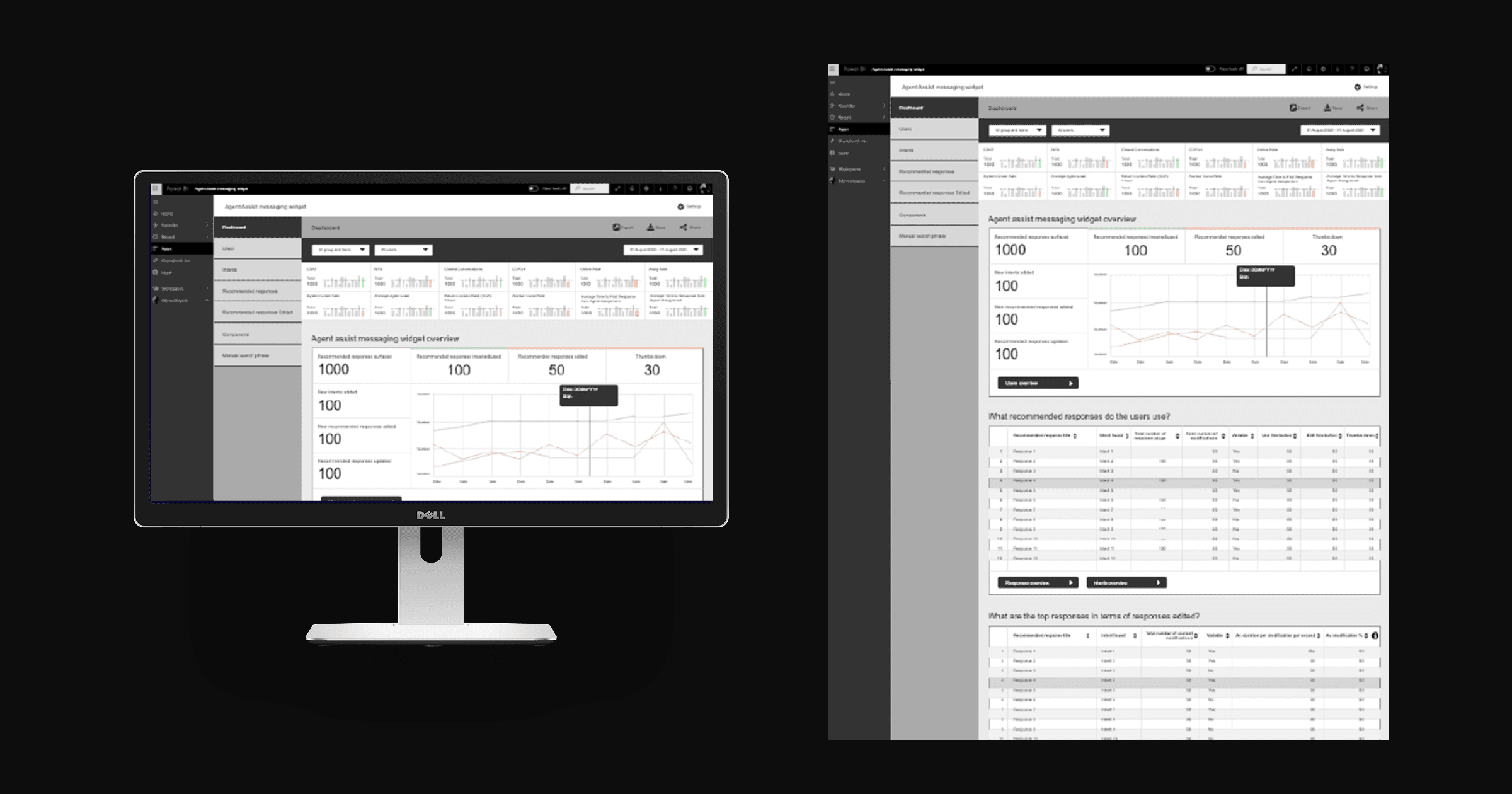
Following user testing, the design scope extended to an analytics layer. A Power BI dashboard prototype was developed to help the business track early adopter metrics, giving the operations team visibility into how consultants were using the widget and where friction remained.
Link to the prototype
Outcome
User testing anticipated a 60% improvement in operational efficiency compared to the baseline performance. The Agent Assist widget addressed all four core problem statements: consultants could surface relevant content without leaving the agent workspace, AI-suggested phrasing reduced the re-wording burden, and the search experience was transformed from a manual scan into an intelligent retrieval layer.
The MVP was delivered successfully, with a post-launch monitoring plan built around usage metrics and the CSUQ framework to support ongoing iteration. Plans were established to introduce accelerators to push efficiency gains further in subsequent releases.
Beyond the operational numbers, the project demonstrated that AI augmentation could be designed in a way that consultants found trustworthy and genuinely useful. Employee engagement concerns were addressed through design decisions, not just communications, and the AI ethics framework developed during discovery continued to inform the product roadmap.
Field | Detail |
|---|---|
Client/Company | Bupa Australia & New Zealand |
Location | Melbourne, Australia |
Scope | User research, UX design, prototyping, user testing, final UI, design system |
Role | Senior UX Designer |
Deliverables | User research report, prototypes, user testing report, final UI, design system (UI Kit) |
Domain | UX Design, UI Design |
Timeline | 2019 – 2020 |
Bupa's customer service business unit had been running its Contact Centre of the Future program since 2018, a multi-year initiative to restructure how its consultants handled customer communications at scale. The voice team had already implemented NLU (Natural Language Understanding) capability for inbound calls, improving communication quality and reducing average handling time. The next frontier was messaging.
By 2019, the asynchronous messaging team was managing multiple customer enquiries simultaneously through a web-chat platform. As volume grew across channels including WhatsApp, Apple Business Chat, and web-chat, the business unit made the decision to introduce an AI-powered capability to help consultants respond faster, more accurately, and with greater consistency. The Agent Assist messaging widget was the design response to that challenge.
Challenge
The core problem was operational, but the surface it touched was human. Consultants were managing multiple live conversations at once, searching across several platforms to find the right information, and then manually re-wording knowledge base articles into a register suitable for messaging. It was slow, repetitive, and unsustainable at scale.
Introducing AI into this workflow carried its own risk. Consultants were anxious about what automation would mean for their roles. Stakeholders were focused on efficiency metrics. The design challenge was to build something that served both without compromising either.
Alongside the operational goals, AI ethics were treated as a first-class design consideration from the outset. The system needed to augment consultants, not replace them, and that distinction had to be legible in the product itself.
Approach
Discovery
The process began with stakeholder and employee interviews, structured around two key questions about daily responsibilities and where support would be most valuable. These were chosen deliberately to surface what consultants valued in their own work, and what felt rote or draining, without framing the conversation around AI replacement.
Four recurring themes emerged across interviews: the centrality of knowledge to every customer interaction, insufficient training time, problem-solving as a core competency, and the burden of context-switching across multiple platforms to find answers.
Define
The interview findings were translated into four problem statements that shaped the entire design requirements.
Find right information — Consultants needed to locate the correct article immediately, while the customer was actively waiting. A slow or unreliable search created pressure and errors.
Poor search experience — The existing knowledge base platform lacked machine learning. Search results were unpredictable, and consultants spent too long scanning the results page for the relevant article.
Re-word contents — Once a consultant found an article, they had to manually translate it from knowledge base language into messaging language. The tonal shift was non-trivial and added time to every interaction.
Repetitive work — The re-wording step happened across every conversation, dozens of times per shift. It was the highest-volume, lowest-value task in the workflow.
AI Ethics Framework
Before any ideation, the team worked through an AI ethics framework that examined the competing perspectives of stakeholders and consultants. From the business side, the focus was on operational efficiency, reducing unanswered enquiries and cost per interaction. From the consultant side, the concerns were more personal: fear of job displacement, declining engagement under pressure, and a lack of clarity about what augmentation would actually look like in practice.
The design framework set out to address both. Appropriate KPIs were established to measure the right outcomes. Career development pathways and training commitments were recommended alongside the product launch. The widget was positioned explicitly as an assistant rather than an automation layer.
Ideate and Prototype
The ideation phase generated hypotheses around how an AI widget could surface relevant knowledge base content in context, reduce the re-wording burden through suggested phrasing, and be embedded within the existing agent workspace without requiring consultants to change platforms.
Conversation flows were developed to map how AI suggestions would appear in relation to the customer message thread. Wireframes went through multiple rounds of iteration before advancing to high-fidelity prototyping.
Links to the prototypes
Test
User testing was conducted using the Computer System Usability Questionnaire (CSUQ), measuring across four dimensions: interface quality, information quality, overall satisfaction, and system usefulness. The testing protocol captured both quantitative usability scores and qualitative consultant sentiment, particularly around the AI ethics concerns surfaced during discovery.
Analytics Design and MVP Launch
Following user testing, the design scope extended to an analytics layer. A Power BI dashboard prototype was developed to help the business track early adopter metrics, giving the operations team visibility into how consultants were using the widget and where friction remained.
Link to the prototype
Outcome
User testing anticipated a 60% improvement in operational efficiency compared to the baseline performance. The Agent Assist widget addressed all four core problem statements: consultants could surface relevant content without leaving the agent workspace, AI-suggested phrasing reduced the re-wording burden, and the search experience was transformed from a manual scan into an intelligent retrieval layer.
The MVP was delivered successfully, with a post-launch monitoring plan built around usage metrics and the CSUQ framework to support ongoing iteration. Plans were established to introduce accelerators to push efficiency gains further in subsequent releases.
Beyond the operational numbers, the project demonstrated that AI augmentation could be designed in a way that consultants found trustworthy and genuinely useful. Employee engagement concerns were addressed through design decisions, not just communications, and the AI ethics framework developed during discovery continued to inform the product roadmap.
Case study walkthroughs available upon request.
Case study walkthroughs available upon request.
© 2026 Mokujiro Studio
© 2026 Mokujiro Studio