MokuPhoto: AI-Powered Publishing
Automated the photography workflow from RAW files to a published online gallery.
Field | Detail |
|---|---|
Product | MokuPhoto |
Live Site | |
Type | Internal platform — photography publishing pipeline + gallery component |
Scope | CLI pipeline engineering, AI image analysis, Framer React component, Cloudflare R2 storage & delivery, CMS architecture |
Stack | TypeScript, Claude Haiku Vision API, Framer React, Cloudflare R2, Framer CMS |
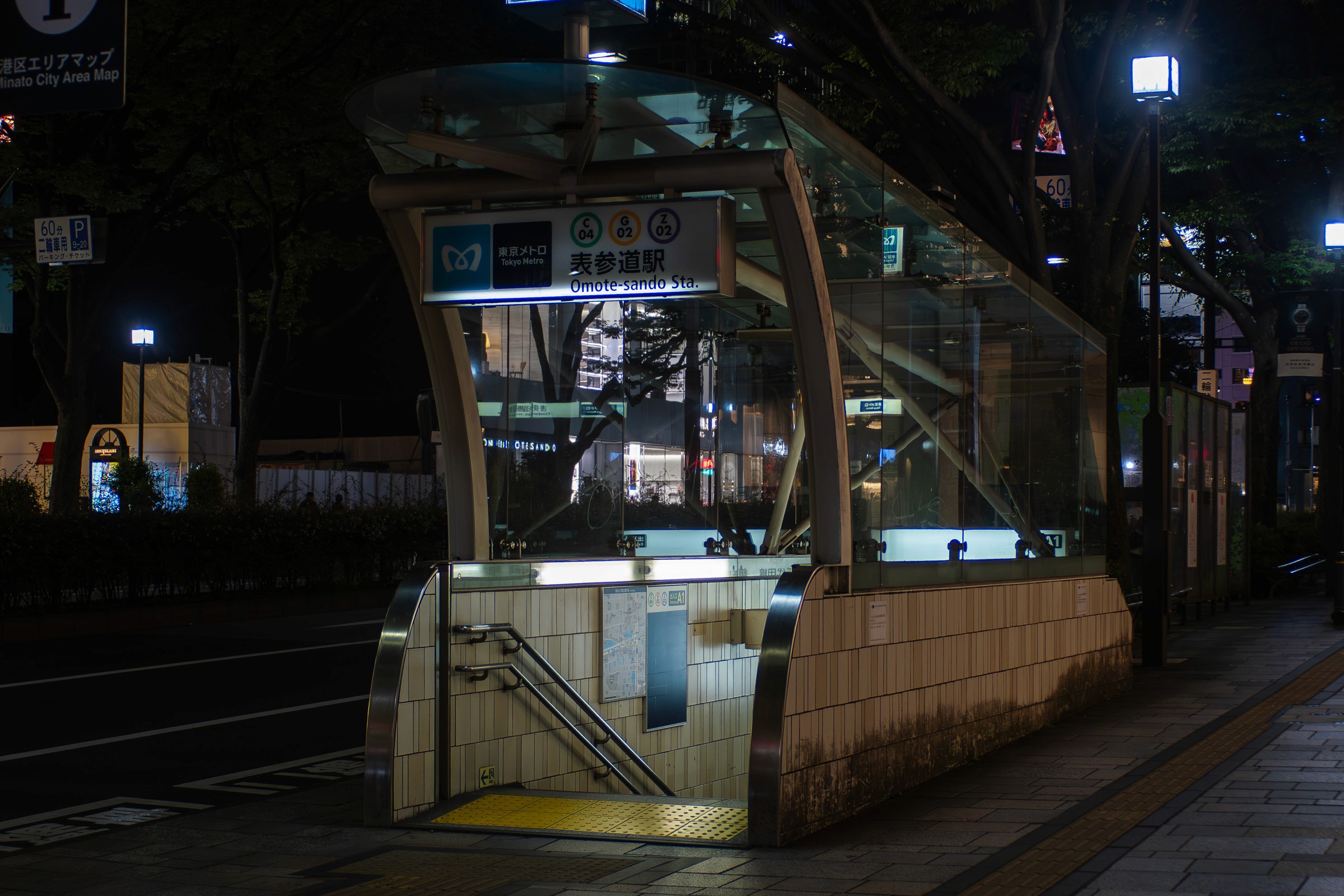
Equipment | OM System OM-3 + Panasonic Leica 15mm f/1.7, Zuiko 28mm f/3.5 |
Locations | Tokyo, Osaka, Kyoto, Nara, Kagawa, Melbourne |
Studio | Mokujiro Studio |
Timeline | May–June 2026 |
Context
The photography section of the Mokujiro portfolio exists because the work demands it. Photography is central to the studio's visual identity — not as stock imagery sourced from elsewhere, but as original work shot, developed, and published through a system built for exactly this purpose.
The OM System OM-3 was chosen deliberately. It's a Micro Four Thirds body — smaller and lighter than full-frame alternatives — paired with a mix of modern electronic lenses and vintage Olympus OM Zuiko glass from the 1970s. The vintage lenses are manual focus, manual aperture, adapted to the modern mount. They produce images with a character that modern optics don't replicate: lower contrast, softer flare behaviour, a rendering quality that comes from decades-old optical design.
Shooting is only the beginning. The problem was everything that comes after: developing RAW files, generating metadata, writing titles and descriptions, uploading to a CDN, syncing with a CMS, and displaying the results in a gallery that does the work justice. Each step was manual, disconnected, and slow. MokuPhoto was built to solve that.
The Pipeline
From Camera to Gallery
MokuPhoto is a CLI tool written in TypeScript that handles the entire post-production workflow after Lightroom export. The process runs in two commands:
npm run generate
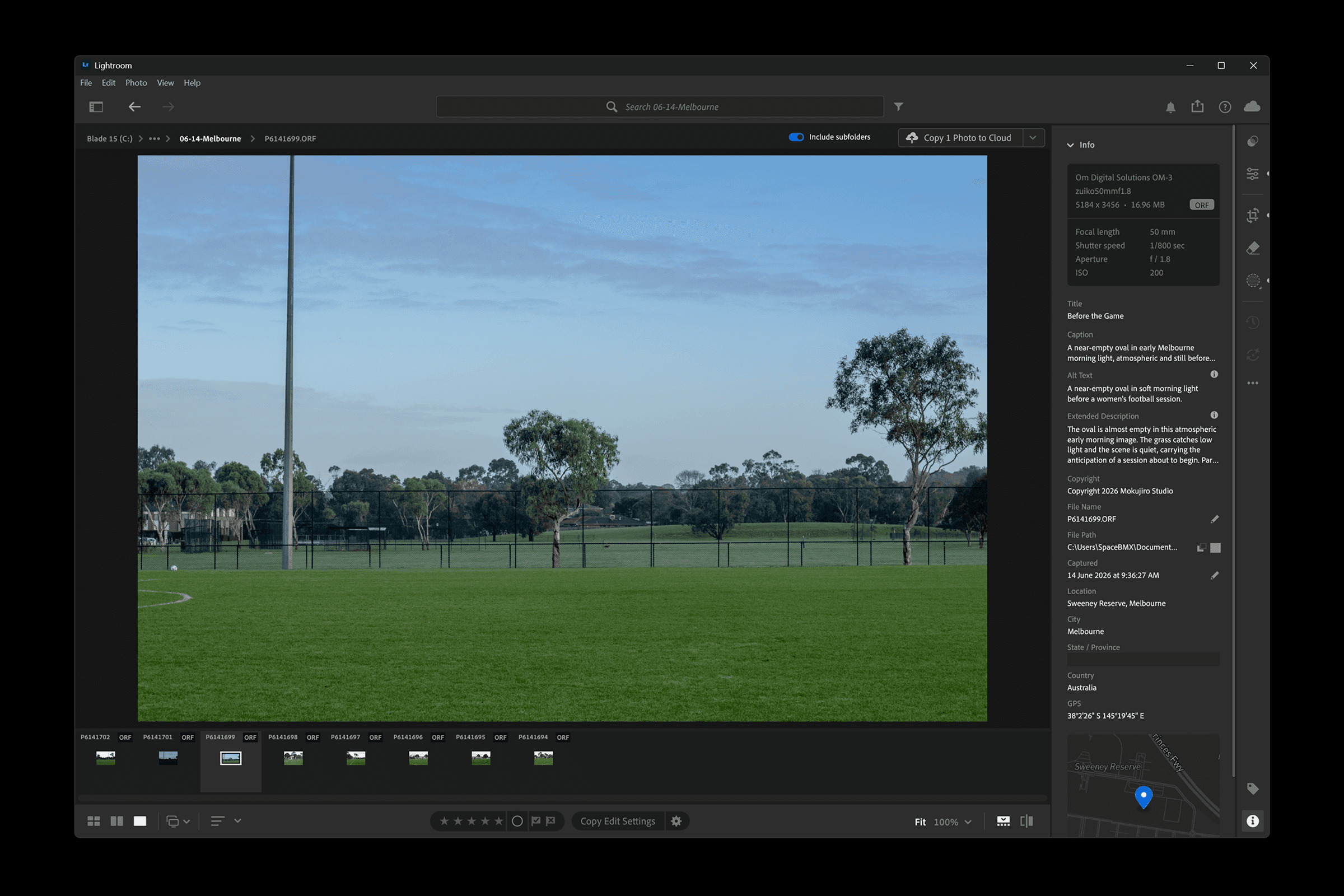
Reads the exported JPEG files, extracts EXIF metadata using exifr, runs Claude Haiku vision analysis to generate titles, descriptions, alt text, keywords, and theme classification for each photograph, and writes the results as individual JSON sidecar files. It also generates a series-level description that summarises the collection as a whole.
npm run publish
Uploads the photographs to Cloudflare R2, builds a series JSON file that the gallery component reads at runtime, and writes a sync manifest for CMS integration. The entire process — from a folder of exported JPEGs to a live gallery page — takes under a minute for a typical series of 15–20 photographs.
AI Metadata Generation
Every photograph in the portfolio has its title, description, and alt text written by Claude Haiku's vision model. The prompt is tuned for fine art photography — titles are poetic and short (3–6 words), descriptions are written for a gallery viewer, and alt text is plain and factual for accessibility.
The AI receives EXIF context alongside the image: camera, lens, aperture, shutter speed, ISO, and location. This grounds the analysis — a photograph shot at f/1.7 in low light is described differently from one shot at f/11 in bright sun.
After individual photos are analysed, a second AI call generates a 2-sentence series description from all the photo descriptions, creating a cohesive narrative for the collection page.
State Management
The pipeline tracks what has been published using a local state file that records file hashes. Re-running publish on a series skips unchanged photographs and only uploads new or modified files. This makes iterative publishing fast — editing a metadata sidecar and re-publishing only pushes the updated series JSON, not all the images.
Retroactive Enrichment
When new analysis capabilities are added to the pipeline — such as the AI Aperture Estimation feature — they can be applied to existing published series without re-running the full generation process. A dedicated --aperture-only flag runs only the new analysis on existing metadata, then --series-only pushes the updated JSON without re-uploading photographs.
This pattern means the pipeline evolves without invalidating previous work.
SeriesViewer Component
The gallery is rendered by SeriesViewer, a Framer React code component built specifically for this portfolio. It fetches a JSON file from R2 at runtime and renders a complete photography viewing experience.
Layout
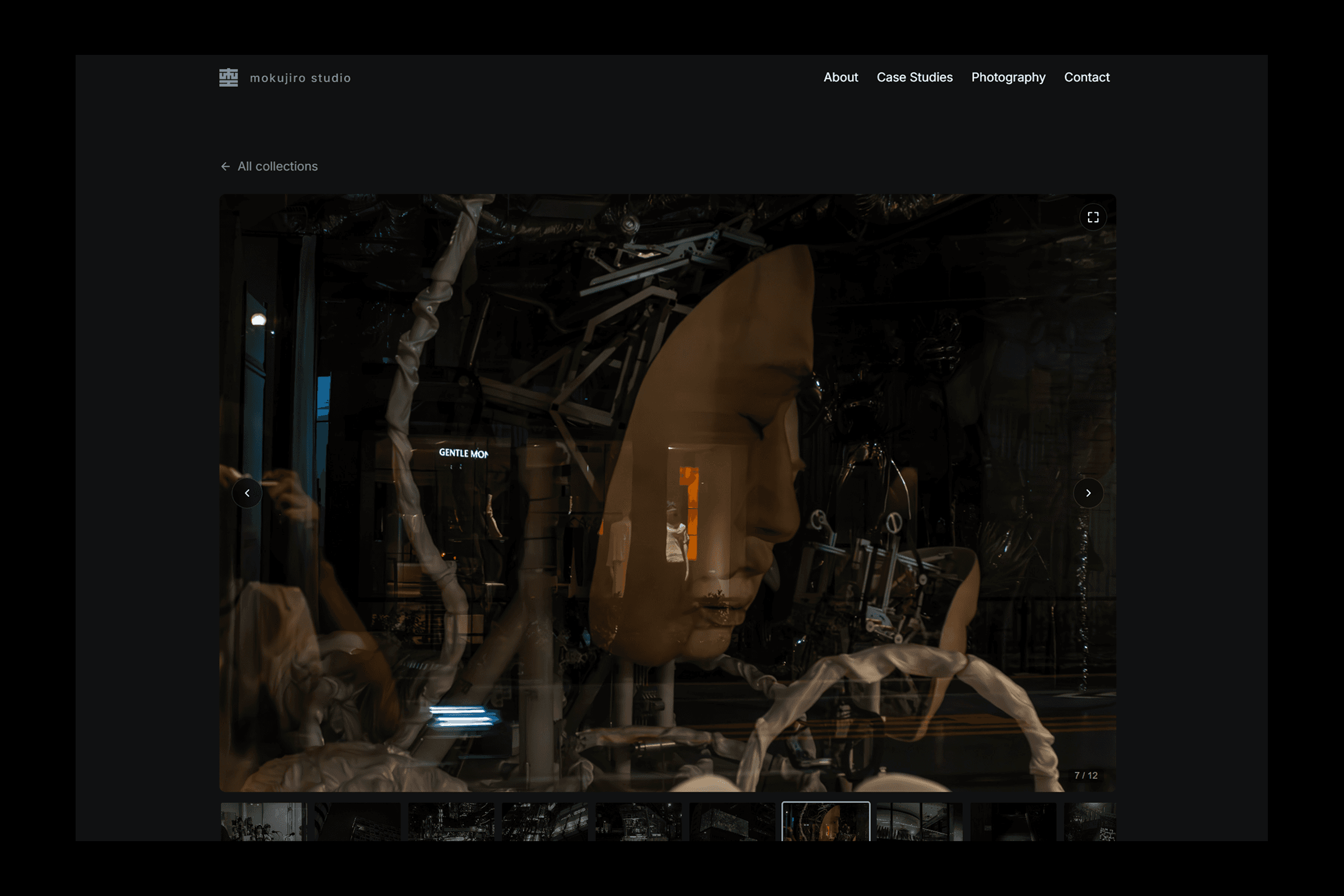
The main image is displayed at a 3:2 aspect ratio with object-fit contain — the photograph is never cropped. Below it, a horizontally scrollable thumbnail strip with drag-to-scroll and active-state highlighting lets viewers navigate the series. The metadata panel sits beside the image on desktop and below it on mobile, with two tabs: Overview (location, camera, lens, date, keywords) and Shooting Data (aperture, shutter speed, ISO, exposure mode, focus, metering, stabilisation).
Fullscreen
A fullscreen mode uses the Fullscreen API with a CSS fallback for browsers that don't support it. On mobile Android devices, the component requests landscape orientation lock for immersive viewing. Navigation works via touch swipe, keyboard arrows, and the circular arrow buttons.
Responsive Design
The component uses ResizeObserver to detect its own container width — not the browser viewport — which means it responds correctly inside Framer's breakpoint frames. Below 600px, the layout collapses to single-column with smaller thumbnails and touch-optimised controls.
CMS Integration
The photography section uses two Framer CMS collections. The Series collection stores the series name, cover image, and data URL (pointing to the R2-hosted JSON). The index page renders a grid of series cards from this collection. Each card links to a detail page that passes the data URL to SeriesViewer, which fetches and renders the full series at runtime.
This architecture means adding a new series requires no page creation in Framer — just a CMS entry with the R2 URL. The pages are generated automatically from the collection.
The Kit
The photographs are shot on the OM System OM-3 with three lenses:
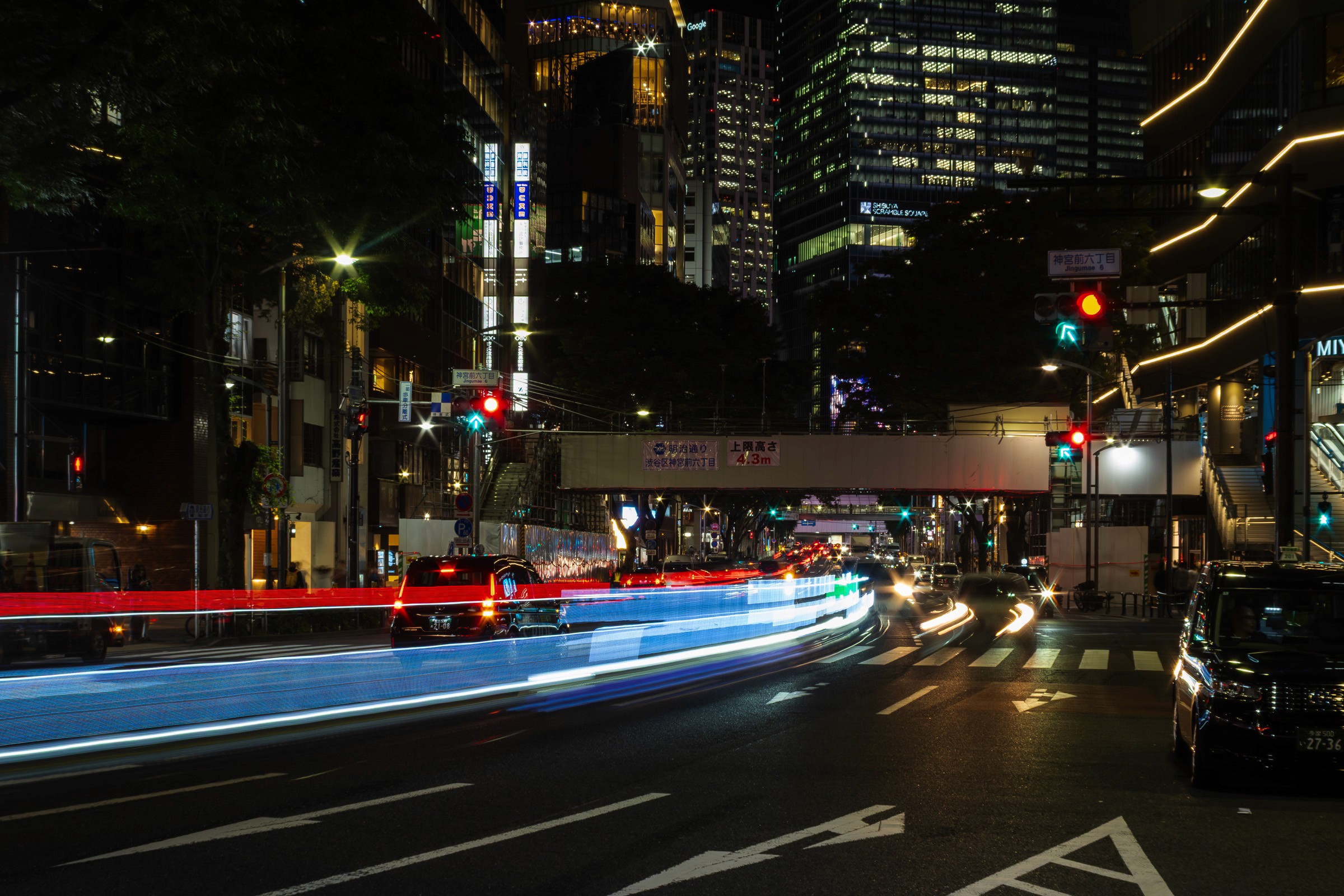
Panasonic Leica DG Summilux 15mm f/1.7 — The primary lens for low light and street work. Fast, sharp, and electronically coupled to the camera body. 30mm equivalent on Micro Four Thirds.
Olympus OM Zuiko 28mm f/3.5 — The vintage manual prime. Adapted to MFT via a passive adapter. No electronic communication — aperture, focus, and focal length are all manual. Produces images with lower contrast, distinctive flare, and a rendering quality that comes from 1970s optical design. 56mm equivalent.
RAW files are developed in Lightroom Classic with minimal processing — exposure correction, white balance, and selective tone adjustments. The goal is to honour what the lens captured rather than impose a digital aesthetic.
Outcome
MokuPhoto currently hosts seven published series across six cities in Japan and Australia: Tokyo (3 series), Osaka, Kyoto, Kagawa, and Melbourne. The portfolio contains 118 photographs, each with AI-generated titles, descriptions, alt text, keywords, and — for vintage lens images — estimated aperture values.
The pipeline handles the entire post-Lightroom workflow in two commands. Adding a new series to the live site takes under five minutes from the first export to a published gallery page. The SeriesViewer component renders every series page without requiring any Framer page creation — the CMS drives the entire structure.
The system was designed to grow. Each new capability — AI aperture estimation, shooting data display, metadata enrichment — plugs into the existing pipeline without breaking what came before. The photographs are the work. The pipeline makes sure they reach the portfolio with the metadata they deserve.
MokuPhoto: AI-Powered Publishing
Automated the photography workflow from RAW files to a published online gallery.
Field | Detail |
|---|---|
Product | MokuPhoto |
Live Site | |
Type | Internal platform — photography publishing pipeline + gallery component |
Scope | CLI pipeline engineering, AI image analysis, Framer React component, Cloudflare R2 storage & delivery, CMS architecture |
Stack | TypeScript, Claude Haiku Vision API, Framer React, Cloudflare R2, Framer CMS |
Equipment | OM System OM-3 + Panasonic Leica 15mm f/1.7, Zuiko 28mm f/3.5 |
Locations | Tokyo, Osaka, Kyoto, Nara, Kagawa, Melbourne |
Studio | Mokujiro Studio |
Timeline | May–June 2026 |
Context
The photography section of the Mokujiro portfolio exists because the work demands it. Photography is central to the studio's visual identity — not as stock imagery sourced from elsewhere, but as original work shot, developed, and published through a system built for exactly this purpose.
The OM System OM-3 was chosen deliberately. It's a Micro Four Thirds body — smaller and lighter than full-frame alternatives — paired with a mix of modern electronic lenses and vintage Olympus OM Zuiko glass from the 1970s. The vintage lenses are manual focus, manual aperture, adapted to the modern mount. They produce images with a character that modern optics don't replicate: lower contrast, softer flare behaviour, a rendering quality that comes from decades-old optical design.
Shooting is only the beginning. The problem was everything that comes after: developing RAW files, generating metadata, writing titles and descriptions, uploading to a CDN, syncing with a CMS, and displaying the results in a gallery that does the work justice. Each step was manual, disconnected, and slow. MokuPhoto was built to solve that.
The Pipeline
From Camera to Gallery
MokuPhoto is a CLI tool written in TypeScript that handles the entire post-production workflow after Lightroom export. The process runs in two commands:
npm run generate
Reads the exported JPEG files, extracts EXIF metadata using exifr, runs Claude Haiku vision analysis to generate titles, descriptions, alt text, keywords, and theme classification for each photograph, and writes the results as individual JSON sidecar files. It also generates a series-level description that summarises the collection as a whole.
npm run publish
Uploads the photographs to Cloudflare R2, builds a series JSON file that the gallery component reads at runtime, and writes a sync manifest for CMS integration. The entire process — from a folder of exported JPEGs to a live gallery page — takes under a minute for a typical series of 15–20 photographs.
AI Metadata Generation
Every photograph in the portfolio has its title, description, and alt text written by Claude Haiku's vision model. The prompt is tuned for fine art photography — titles are poetic and short (3–6 words), descriptions are written for a gallery viewer, and alt text is plain and factual for accessibility.
The AI receives EXIF context alongside the image: camera, lens, aperture, shutter speed, ISO, and location. This grounds the analysis — a photograph shot at f/1.7 in low light is described differently from one shot at f/11 in bright sun.
After individual photos are analysed, a second AI call generates a 2-sentence series description from all the photo descriptions, creating a cohesive narrative for the collection page.
State Management
The pipeline tracks what has been published using a local state file that records file hashes. Re-running publish on a series skips unchanged photographs and only uploads new or modified files. This makes iterative publishing fast — editing a metadata sidecar and re-publishing only pushes the updated series JSON, not all the images.
Retroactive Enrichment
When new analysis capabilities are added to the pipeline — such as the AI Aperture Estimation feature — they can be applied to existing published series without re-running the full generation process. A dedicated --aperture-only flag runs only the new analysis on existing metadata, then --series-only pushes the updated JSON without re-uploading photographs.
This pattern means the pipeline evolves without invalidating previous work.
SeriesViewer Component
The gallery is rendered by SeriesViewer, a Framer React code component built specifically for this portfolio. It fetches a JSON file from R2 at runtime and renders a complete photography viewing experience.
Layout
The main image is displayed at a 3:2 aspect ratio with object-fit contain — the photograph is never cropped. Below it, a horizontally scrollable thumbnail strip with drag-to-scroll and active-state highlighting lets viewers navigate the series. The metadata panel sits beside the image on desktop and below it on mobile, with two tabs: Overview (location, camera, lens, date, keywords) and Shooting Data (aperture, shutter speed, ISO, exposure mode, focus, metering, stabilisation).
Fullscreen
A fullscreen mode uses the Fullscreen API with a CSS fallback for browsers that don't support it. On mobile Android devices, the component requests landscape orientation lock for immersive viewing. Navigation works via touch swipe, keyboard arrows, and the circular arrow buttons.
Responsive Design
The component uses ResizeObserver to detect its own container width — not the browser viewport — which means it responds correctly inside Framer's breakpoint frames. Below 600px, the layout collapses to single-column with smaller thumbnails and touch-optimised controls.
CMS Integration
The photography section uses two Framer CMS collections. The Series collection stores the series name, cover image, and data URL (pointing to the R2-hosted JSON). The index page renders a grid of series cards from this collection. Each card links to a detail page that passes the data URL to SeriesViewer, which fetches and renders the full series at runtime.
This architecture means adding a new series requires no page creation in Framer — just a CMS entry with the R2 URL. The pages are generated automatically from the collection.
The Kit
The photographs are shot on the OM System OM-3 with three lenses:
Panasonic Leica DG Summilux 15mm f/1.7 — The primary lens for low light and street work. Fast, sharp, and electronically coupled to the camera body. 30mm equivalent on Micro Four Thirds.
Olympus OM Zuiko 28mm f/3.5 — The vintage manual prime. Adapted to MFT via a passive adapter. No electronic communication — aperture, focus, and focal length are all manual. Produces images with lower contrast, distinctive flare, and a rendering quality that comes from 1970s optical design. 56mm equivalent.
RAW files are developed in Lightroom Classic with minimal processing — exposure correction, white balance, and selective tone adjustments. The goal is to honour what the lens captured rather than impose a digital aesthetic.
Outcome
MokuPhoto currently hosts seven published series across six cities in Japan and Australia: Tokyo (3 series), Osaka, Kyoto, Kagawa, and Melbourne. The portfolio contains 118 photographs, each with AI-generated titles, descriptions, alt text, keywords, and — for vintage lens images — estimated aperture values.
The pipeline handles the entire post-Lightroom workflow in two commands. Adding a new series to the live site takes under five minutes from the first export to a published gallery page. The SeriesViewer component renders every series page without requiring any Framer page creation — the CMS drives the entire structure.
The system was designed to grow. Each new capability — AI aperture estimation, shooting data display, metadata enrichment — plugs into the existing pipeline without breaking what came before. The photographs are the work. The pipeline makes sure they reach the portfolio with the metadata they deserve.
Case study walkthroughs available upon request.
Case study walkthroughs available upon request.
© 2026 Mokujiro Studio
© 2026 Mokujiro Studio